The position of a Secretary of State that Conduleeza Rice held during the President Bush's mandate, makes her one of the chief architects of the Iraq War. Also, she was one of those who justified the use of “enhanced interrogation techniques” (forms of torture) as a US national security adviser. All of the aforementioned, mostly for political reasons, undermines the confidence that Dropbox will keep its users' data secure, and fight to keep it that way.
As the Dropbox announcement goes: “There’s nothing more important to us than keeping your stuff safe and secure. It’s why we’ve been fighting for transparency and government surveillance reform, and why we’ve been vocal and public with our principles and values. We should have been clearer that none of this is going to change with Dr. Rice’s appointment to our Board.”
Unfortunately, the Dropbox users have difficulties believing the aforementioned statement. That is why, I would like to focus your attention to other cloud storage systems, provided by other companies, uninvolved with politics.
Here is our selection of some of the best cloud storage services, available on the market.

The platform allows you to share files and folders instantly with other users. It provides secure cloud storage by encrypting your files before they are even uploaded. This way you can safely backup all your digital belongings and access them via Windows, Mac and Linux, as well as any mobile device. You can access your files even offline.
Unlike other file sharing services, Bitcasa allows you to view or stream any type of file without additional software required.
The Bitcasa virtual drive works and looks just like any standard hard drive, except it does not run out of space. (In case you've ordered a paid version). Bitcasa helps you save valuable space on your non-virtual drives.
The cloud storage system automatically backups your files even on mobile. You just need to download and install the Bitcasa application for iPad, iPhone or Android.
The plans that Bitcasa offers are, as follows:
Free – Up to 20 GB storage space
Premium – 1 TB storage space – 10$/month – Up to 5 devices
Pro – 5 TB storage space – 49$/month – Up to 5 devices
Infinite – Unlimited storage space – 99$/month – Up to 5 devices

The Mega online cloud storage platform provides the generous 50GB free storage space. It offers a cloud-based data backup service for your documents and files, which can be accessed through any device connected to the internet.
Once registered to the Mega, you can start uploading files or folders, as well as simultaneously download data from the web platform. Mega can integrate with your desktop computer system if you download and install the MegaSync application. Mega is also available for mobiles, such as iPhone and Android devices.
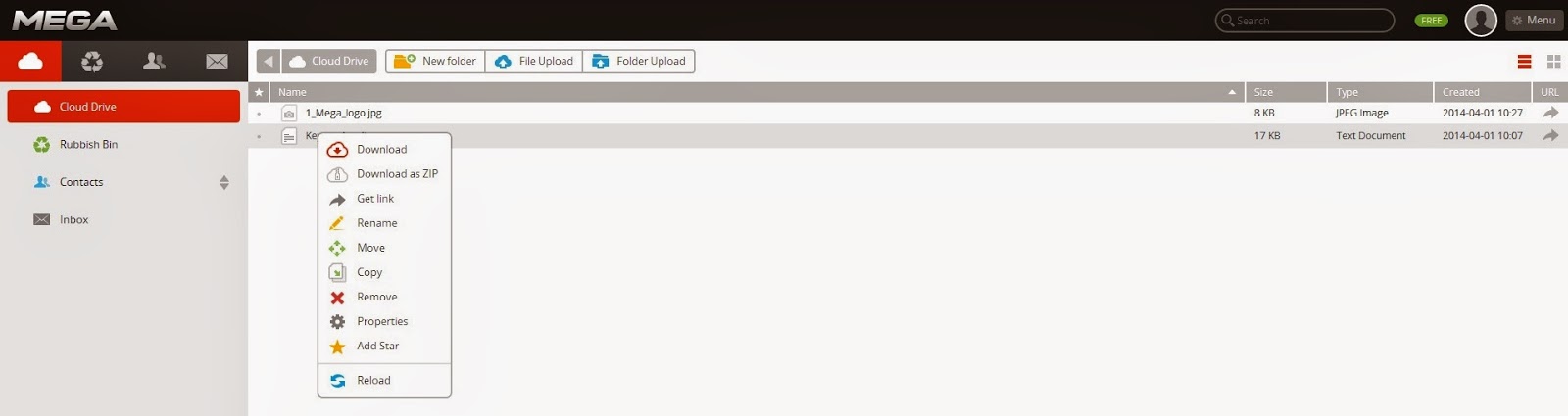
Once you have uploaded a file, you can right-click on it and make use of the additional features the online file storage platform provides.

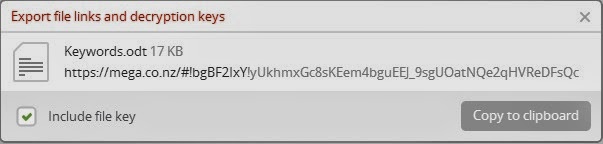
Upon sharing your files, you can set authorization rights to the users – whether you will provide them with read only or full access. Since the files you upload to the platform become encrypted in the process of uploading, the users shall also receive a decryption code that is shared along with the URL to the file. Using this, your collaborators can freely download and use the files they are provided access to. As you can conclude, Mega is mostly dedicated to privacy.
Unlike other cloud services, Mega supports unlimited size of the files you upload. This way it ensures large file transfer at reasonable upload and download speeds.
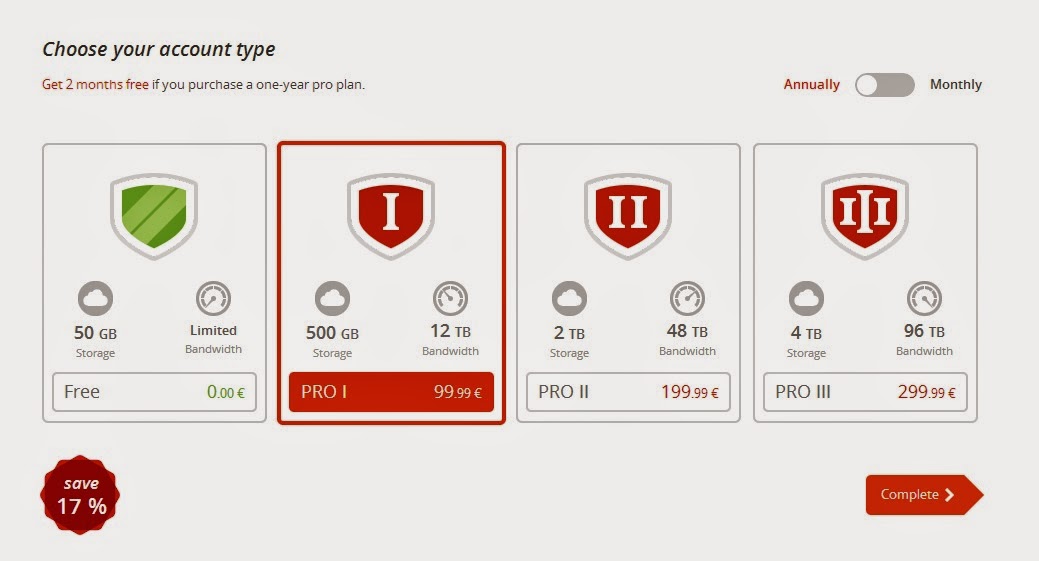
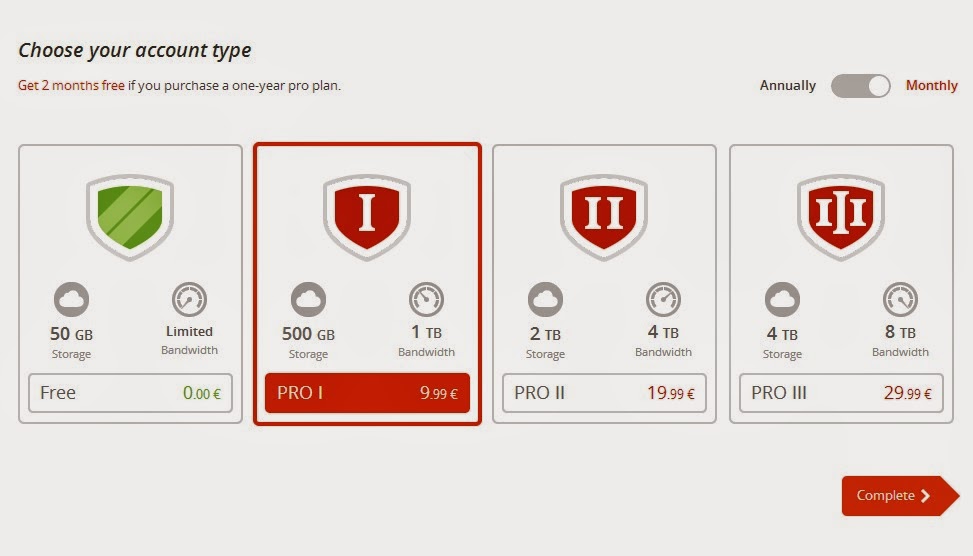
In terms of the plans offered, Mega has the following options for you:

These prices make Mega the cheapest cloud storage service on the market.

pCloud is a relatively new cloud storage service, which is developing in very impressive speeds. With up to 20GB free storage space at sign up, this online cloud platform will be very helpful for your everyday needs. Businesses can benefit from it by upgrading to 100GB, 300GB or 1TB online storage space for any types of documents and files. pCloud is a secure space where you can store all of your audios, photos, videos, etc. and any other valuable digital belongings.

This online storage platform provides you with the opportunity to share and store your files without bothering about any speed or size issues. Your data is available on any of your devices, wherever you go, anytime. The cloud service is available for web and any desktop and mobile devices.
If you download the pCloud application for desktop or mobile, it provides you with a virtual drive, where you can store and automatically sync your files with your online account. Synchronization goes really fast and easy in both directions (web ↔ device).
With pCloud you can easily share your files and folders with your family, friends and colleagues. To share a file, you can generate a link, which you can submit to anyone and provide them with access to your files for download or upload purposes. If you decide to share a folder, you can provide access to it using the sharing system of pCloud, which sends an automatic email to your friend and provides them with a link to your folder. Upon sharing you can set access rights to your recipients – whether they can view, modify, delete, etc. your files and folders.

As a third option, you can share a link to a folder so other users can upload files to your account. Using the upload link you can easily receive any types of files online.
A nice service that pCloud provides is backing up your digital data from social platforms like Facebook, Instagram and Picasa.
Since you can access your pCloud account anywhere, on any device, you can easily view your files directly on the pCloud online storage platform. You can even play video and audio files in real time.
A nice service that pCloud provides is backing up your digital data from social platforms like Facebook, Instagram and Picasa.
Since you can access your pCloud account anywhere, on any device, you can easily view your files directly on the pCloud online storage platform. You can even play video and audio files in real time.

Copy is an advanced cloud storage platform that helps you store, synchronize and protect the important documents and files residing on your computer or mobile device. It provides a well managed and secure cloud environment that encrypts and protects your vulnerable data.
When you register an account, you automatically get 15GB storage space for free. The platform also offers a referral scheme, through which you can earn 5 GB bonus free space.
If you decide to install the Copy desktop application, it automatically creates a folder on your computer, where you can store your valuable files and let them automatically upload and backup to cloud.
With Copy, file sharing is quite simple. You can do that through a customized link, provided through the platform. Simply right-click on the Copy desktop folder on your computer or on a particular file in the folder. A menu appears, offering the following file sharing options:

You can create a link to your files and share the link with other users and friends. This way they can easily view and download your files, even if they do not have a Copy account.
The business users can also benefit from the service through the Update Billing Settings section on the Copy website, where they can upgrade to a paid version of the service. The plans offered start from $10 a month for 250GB and go up.
Users can easily set up public or private partitions in their cloud storage space and share their data with their colleagues, in just one click. There are two ways of sharing files – Public or Private.
When you open a link to another Copy account, sent to you from another user, a button appears, saying Copy to Save, next to the Download button. Using this, you can save the file directly to your Copy account – neat and simple. No need to download and upload it, all is done simultaneously.
The platform works on Windows, Linux and Mac. On mobile, Copy works with iPhone, iPad, and Android.